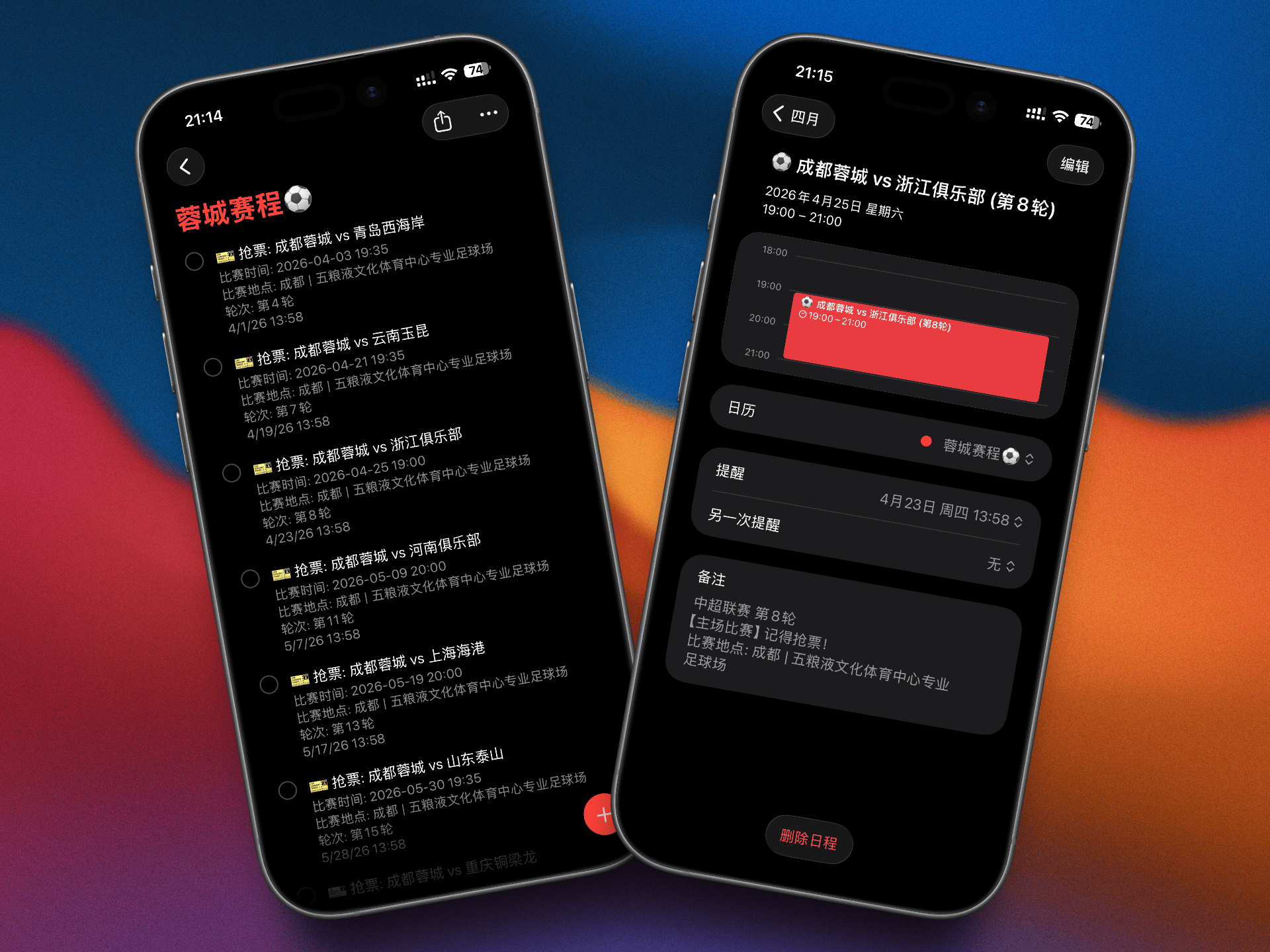
vibe-coding蓉城比赛苹果生态日历+提醒事项
核心诉求 一句话解释,我对手搓这套流程的核心诉求就两个:
统一添加日历 :现在 iOS 26 支持了很完善的日历闹钟体系,把全量比赛导入进去,主场比赛定一个提前两天的抢票闹钟,便于准时抢票,直截了当。同步到提醒事项 (Reminders) :让赛程进入我的日常 Todo 流,每天看一眼任务列表,就能知道当天有球赛,不错过客场转播。
排坑与落地方案 既然目标明确,那落地其实就是一套没有任何技术门槛的自动化流水线:识别赛程图片(获取赛程) -> 解析为结构化数据 -> 写入苹果生态系统 。
1. 结构化数据提取 (Recognition & Parsing) 没找到现成的赛程列表,一搜只有图片格式,直接丢给 AI 大模型让它把图里的文字清洗成标准的 JSON 数组。
1
2
3
4
5
6
7
8
{ "round" : 1 , "date" : "2026-03-06" , "time" : "19:35" , "home_away" : "HOME" , "home_team" : "成都蓉城" , "away_team" : "深圳新鹏城" }
把纯文本抽离成能做逻辑判断的数据基石,这是后面所有步骤的前提。
2. 日历模块:生成带抢票闹钟的 ICS 文件 写几行胶水 js 脚本,把前面的 JSON 转出一条条苹果兼容的原生 .ics 记录。主客场分离策略 :
碰到 home_away === 'HOME' 的对象,计算把时间推前 48 小时,加上原生的 VALARM 这个提醒标签(比如提前锁定在 13:58 提示准备抢票)。
坑点注意:必须统一转换为 UTC 格式(尾部带 Z)注入到 .ics 文件里。否则导入不同多端设备的本地化日历时,绝大概率发生时区偏移 bug,算好时差写进去并验证,搞定。
3. 事项模块:强绑 Apple Reminders 双管齐下,既然要让它出现在 Todo 列表里每天一览无余,就顺路再写一撮胶水脚本把赛程给 Reminders 推一份。child_process 调系统自带的 osascript 接口执行 AppleScript 命令行就结束了。
题外话(避坑): remind me date 变量使用,系统当场就会报语义解析报错而卡死。
1 2 3 4 set theDate to current date set year of theDate to 2026 set month of theDate to 3
客场比赛因为不需要抢票,我们只需要安排一个“纯看球提醒”。所以在写入时,我们让脚本在比赛日当天的早上 09:00 推一条任务到当天的 Todo 里。
附件食用指南 (How to Use) 如果你不想自己去跑上面的自动化脚本,我把抽出来的现成底层数据和生成好的高配版日历文件直接放下面了,按需自取:
1. 纯净赛程数据流 (JSON)
怎么用: home_away 判断符。纯给懂点代码的老炮拿去做二次开发用的,比如挂个服务器跑 CRON 给钉钉/飞书群推看球消息。
自动写入”提醒事项”app脚本:
1
2
3
4
5
6
7
8
9
10
11
12
13
14
15
16
17
18
19
20
21
22
23
24
25
26
27
28
29
30
31
32
33
34
35
36
37
38
39
40
41
42
43
44
45
46
47
48
49
50
51
52
53
54
55
56
57
58
59
60
61
62
63
64
65
66
67
68
69
70
71
72
73
74
75
76
77
78
79
const fs = require ('fs' );const { execSync } = require ('child_process' );const scheduleData = JSON .parse (fs.readFileSync ('./rongcheng_2026_schedule.json' , 'utf8' ));const LIST_NAME_KEYWORD = "蓉城赛程" ;console .log (`🚀 开始同步成都蓉城赛程到 Reminders 列表中...` );const addReminder = (title, notes, targetDate ) => { const year = targetDate.getFullYear (); const month = targetDate.getMonth () + 1 ; const day = targetDate.getDate (); const hour = targetDate.getHours (); const minute = targetDate.getMinutes (); const script = ` tell application "Reminders" -- 寻找名为 "${LIST_NAME_KEYWORD} " 的列表 set targetList to missing value repeat with l in lists if name of l contains "${LIST_NAME_KEYWORD} " then set targetList to l exit repeat end if end repeat if targetList is missing value then -- 如果没找到,就自动创建一个 set targetList to make new list with properties {name:"蓉城赛程⚽️"} end if -- 设置提醒时间 (规避日期格式的系统兼容性问题) set theDate to current date set year of theDate to ${year} set month of theDate to ${month} set day of theDate to ${day} set time of theDate to (${hour} * hours + ${minute} * minutes) -- 创建提醒事项 make new reminder at targetList with properties {name:"${title} ", body:"${notes} ", remind me date:theDate, due date:theDate} end tell ` ; try { execSync (`osascript -e '${script.replace(/'/g, "' \\'' ")}'`); console.log(`✅ 添加成功: ${title} (提醒时间: ${month}月${day}日 ${String(hour).padStart(2,'0')}:${String(minute).padStart(2,'0')})`); } catch (err) { console.error(`❌ 添加失败: ${title}`, err.message); } }; let count = 0; // 2. 遍历并添加 Reminder scheduleData.forEach((match) => { const isHome = match.home_away === 'HOME'; const matchName = `${match.home_team} vs ${match.away_team}`; const roundInfo = `第${match.round}轮`; // 之前已成功添加主场,这次只为你追加【客场看球】提醒 if (!isHome) { // 客场比赛,统一在比赛当天的早上 09:00 进行提醒,让你知道晚上有球看! const alarmTime = new Date(`${match.date}T09:00:00+08:00`); const title = `📺 看球: ${matchName} (客场)`; const notes = `今晚打客场啦!\\n比赛时间: ${match.date} ${match.time}\\n比赛地点: ${match.city} | ${match.stadium}\\n轮次: ${roundInfo}`; addReminder(title, notes, alarmTime); count++; } }); console.log(`\\n🎉 同步完成!共向 Reminders 追加了 ${count} 条客场看球提醒!`); console.log(`💡 打开你的 提醒事项(Reminders) APP 刷新一下查看完整赛季!`);
2. 蓉城 2026 专属日历 (ICS)
一键白嫖指南:
强烈建议你在 Mac/iPhone 的原生「日历」App 里,务必先新建一个专属的类别 (例如自己起个名叫“⚽️ 蓉城看球”,并设置成蓉城红配色)。
下载这个 .ics 附件并直接双击它 。
当系统弹出“要将新日程添加到哪里”的提示框时,下拉选项,精准放入你刚刚建好的“⚽️ 蓉城看球”分类里。
打完收工。以后凡是主场比赛,提前两天的 13:58 你的所有苹果设备必定准时震动弹窗叫你抢票。等赛季末打完,你只需在 App 里右键把这个日历分类一键删掉,干干净净,绝不会污染你平时的个人行程。
(全文完)